 Blu Blog
Library books on my e-reader on Linux
Tue 05 March 2024I've used noDRM and Obok DeDRM and DeDRM in the past, but I recently upgraded to a linux machine and had to set up my library borrowing pipeline again. It's been a bit of a struggle. I really don't like just pirating books. Despite my reservations with the publishing industry, I would prefer at least semi-legitimate use of digital borrowing. I say semi-legit because fuck DRM. It's garbage, and I won't put up with it.
So here's how I've set up a way to put epub books on any old e-reader from a linux machine, starting with .ascm files downloaded through local library's digital book borrowing scheme.
You'll need:
- Calibre 7.6
- DeDRM 10.0.3
- ePUBee DRM removal v 3.1.5.2
- WINE, of course
- Adobe Digital Editions 4.5
- Linux (maybe this works with windows? or mac? I have no idea anymore!)
It started with just installing calibre through flatpak, and then importing my calibre library (including plugins). That meant Obok DeDRM and DeDRM were installed "for me" by past me. Now, having swapped full-time to linux, I kinda gave up on having library books anymore. I dislike pirating books (far more than shows or movies, which, fuck em) but... my library doesn't have a suitable way to get books on my e-reader otherwise. I dislike always-on telemetry, so I've always kept my e-reader off the internet and sideloaded books.
I was inspired to revisit the possibility by happenstance: I buy books through ebooks.com, since they sell--and let you filter for--DRM-free books. When I went to download a recent purchase, I saw the following help text:
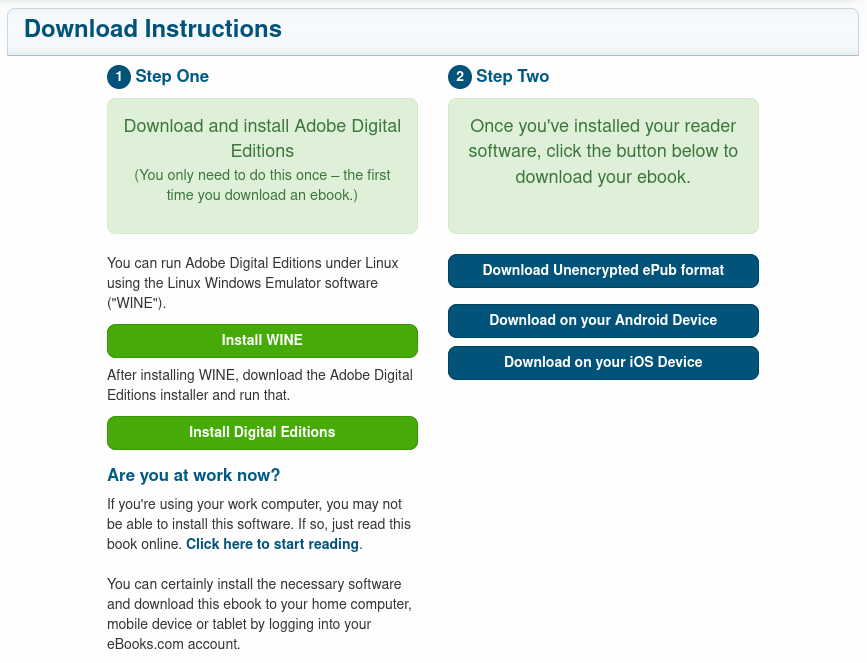
Ebooks was encouraging the use of WINE to use ADE! I thought hey, I guess I've been putting this off too long. So, I installed the hella old version of ADE (1.xx) the ebooks.com button linked to. When it "authorized" properly, I thought I was clear and free, and I made a bash alias to run it and left it alone until today, when my next library book came available.
I downloaded the .ascm (adobe server content message) file from my library, ran my digitaleditions alias, and tried to redeem the file. I got a vague IO error, with an error message ID of 2038. Now, I hate reading, so I googled it and skimmed 1/10th of the words on any page I landed on. I saw a bunch of comments from people saying "yeah I can't use 2.0 anymore". Well, whoops. 1.x is a smaller number than 2.0 so that's almost certainly my problem. So, whatever, let's see about the most recent version--4.5. Got it set up smoothly in WINE and able to redeem the .ascm files into encrypted .epubs. Sweet!
Now, I fired up Calibre and checked for correct versions of DeDRM and Obok DeDRm. All set, so I added books from the My Digital Editions directory--encrypted. Damn, ok. I checked the keys in the plugins by going to Calibre-> Preferences-> Plugins->DeDRM(10.0.3) and double clicking. You can see config for ADE ebooks, where there's a list of keys, a WINEPREFIX box, and some options to import new keys. I made sure my WINEPREFIX was in there correctly, just in case, but it still wouldn't work. Well, that's not what I was hoping for.
Some googling (again, barely reading anything), I saw the name of another piece of software called ePUBee. It has ways to detect and decrypt .epub files mangled by ADE. It's another one to use with WINE, and as long as you install it in the same WINEPREFIX (I, so far, just use the default ~/.wine), you run it and it will look for the encrypted library, figure out which key to use, use it, then deposit the unencrypted file in another directory--for me, c:\users\me\AppData\Roaming. Now, you'll notice that's a windows-ass directory--it's in the same WINEPREFIX's pseudo-c drive.
At this point, I was able to import unencrypted ePubs into Calibre! My workflow was:
- download .ascm file
- run digital editions and request content fulfilment for those
- run ePUBee to decrypt the ePubs
- import into Calibre, chasing down the pseudo-c drive rabbit hole to find the unencrypted files
That's great! but I wanted to simplify, and not have to deal with ~/.wine/drive_c/shenanigans/furthershenanigans for importing. I remember seeing a key import feature in DeDRM--is that worth investigating?
Turns out, it sure is. I went to the import tool, along with its helpful (and unavoidable) file type filter for ADE keys, and started scanning through directories in my WINEPREFIX. I started with looking where ePUBee was installed from, which was in Program Files(x86)\ePUBee\epubeedrmremoval, but I didn't find any keys there. So I looked where the files had been put once decrypted. Jackpot! Turns out there's a key at ~/.wine/drive_c/users/me/AppData/Roaming/.epubee/epubee/adekey0.der. I imported it and tested adding the encrypted books to my Calibre library now--Double Jackpot! So now my workflow was just steps 1, 2, 4, and with a simplified step 4 since I just needed the files in ~/Documents/My\ Digital\ Editions/
So, now that I've recipe-websited you, here's the final process I'd recommend for actually setting this up:
- Install WINE. I won't provide too much instruction on this since there's great resources out there
- Download ADE, probably 4.5.xx and install it in the WINEPREFIX you'll use for ePUBee later ( just do
~/.wine. if you have reason to disagree with me, you didn't need this note.) - Download Calibre (I'm currently on 7.6) and the DeDRM tool
- install the DeDRM plugin per instructions
- Download ePUBee and install it in the same WINEPREFIX as ADE (again, default of
~/.wineis fine)- Run ePUBee once on an encrypted book to make sure it works and extracts the key for you
- In Calibre, go to Preferences-> Plugins->DeDRM(10.0.3). Open config by double clicking, open "Adobe Digital Editions ebooks" option, then Import Existing Keyfiles
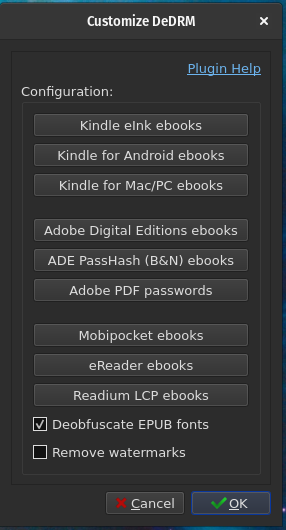
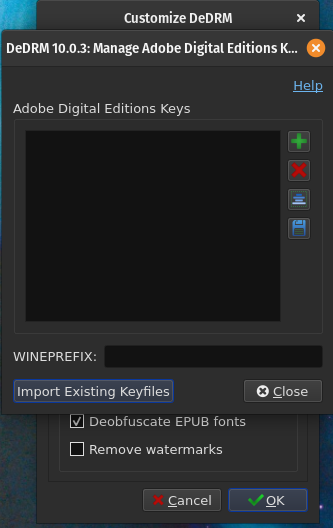
- Navigate to
~/.wine/drive_c/users/me/AppData/Roaming/.ePUBee/epubee/and select the only file there (adekey0.der) to import
And that's it! If your WINE install of ADE included associating .ascm files with it, now all you have to do is double-click one of those and then import files from "My Digital Editions" into Calibre from now on. If not, you might want to set up a bash alias, something like digitaleditions='wine ~/.wine/drive_c/Program\ Files\ \(x86\)/Adobe/Adobe\ Digital\ Editions\ 4.5/DigitalEditions.exe' so you can easily run ADE and have it fulfil .ascm files.